Mouse over WiFi
11 min read

Today I found that I needed to connect a USB mouse to my laptop — and both USB-C ports were occupied, one by the monitor, one by power. Turns out it's not a huge deal on Linux if you have another PC nearby.
The reasonable fix is a €3 USB-C adapter. But the adapter is three days of shipping away, and the other PC — a little Rockchip ARM board that lives on my desk — was right there, with free USB-A ports and a network connection to my laptop. On Linux, "the mouse is plugged into the wrong computer" is not really a hardware problem. It's a routing problem.
Pick your layer
There are two ways to ship a USB device across a network:
Forward the USB device itself — that's usbip, which is in the mainline
kernel. The remote host sees a real USB device, URBs get shuttled over TCP,
and everything that could talk to the physical device can talk to the remote
one. That's the right tool when something needs the device — firmware
flashers, smartcard readers, license dongles.
Forward the input events — a mouse is not an interesting USB device. By
the time applications see it, it's just a stream of tiny input_event
structs coming out of /dev/input/eventN: relative X, relative Y, button,
sync. The kernel will happily accept the same structs back through
/dev/uinput and synthesize a new input device out of them. So instead of
tunneling USB, you can read events on one machine and replay them on the
other. Less protocol, less latency sensitivity, and it works regardless of
what's on the other end — Wayland, X11, a bare console.
For a mouse, events win. The tool for this is
netevent — a ~130 KB binary with two
relevant subcommands: cat (open an event device, dump its events to
stdout) and create (read events from stdin, create a uinput clone). It's
netevent-git in the AUR.
The five-minute version
Find the mouse on the machine it's plugged into. /dev/input/by-id/ gives
you stable names, unlike eventN which reshuffles on replug:
$ ls -l /dev/input/by-id/
lrwxrwxrwx 1 root root  9 platform-noserial-if01-event-mouse -> ../event8
lrwxrwxrwx 1 root root 13 usb-Logitech_USB_Receiver-hidraw -> ../../hidraw0
Then, from the laptop, one pipe:
$ ssh zxc-pc 'sudo netevent cat /dev/input/by-id/platform-noserial-if01-event-mouse' \
    | netevent create
That's genuinely all of it. netevent cat grabs the device exclusively
(EVIOCGRAB — the server machine stops seeing the mouse), streams events
over the SSH connection, and netevent create conjures a virtual "Logitech
USB Receiver Mouse" on the laptop that the desktop picks up like any
hotplugged device. The cursor moves. SSH gives you encryption and auth for
free.
I used exactly this for about an hour. Then the sysadmin brain kicked in, because the pipe has problems:
- it needs
sudoon the server (/dev/input/*is root:input), - it dies silently on suspend, roaming, or a Wi-Fi blip, and takes the mouse with it,
- it drags my interactive SSH config — agent forwarding, a GPG socket RemoteForward — into what should be a dumb transport,
- and it plants a landmine that I would step on two hours later. We'll get there.
The grown-up version: socket activation
What I actually want is an appliance: the server exports the mouse, permanently and cheaply; the laptop attaches when it wants to; the grab — the mouse going dead on the server — should last exactly as long as the attachment. That maps one-to-one onto systemd socket activation:
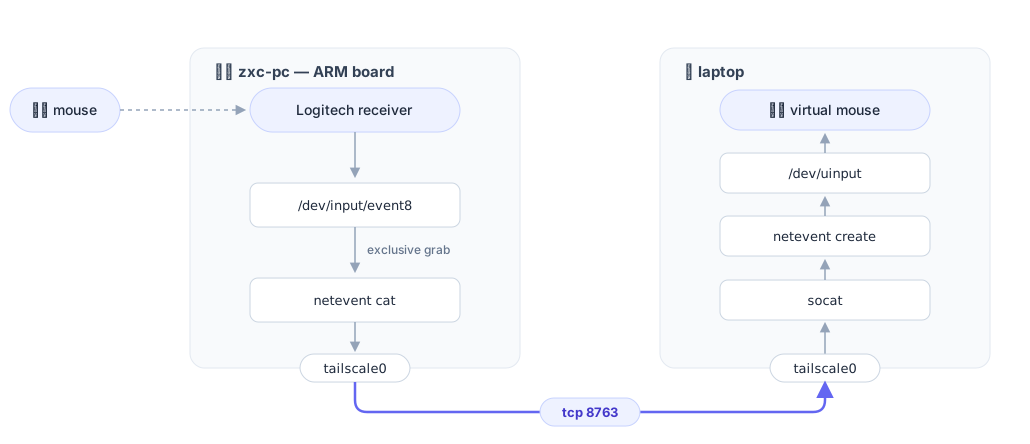
Two unit files on the server. The socket:
# /etc/systemd/system/zxc-mouse.socket
[Unit]
Description=Export Logitech mouse over Tailscale (netevent)

[Socket]
ListenStream=8763
BindToDevice=tailscale0
Accept=yes
MaxConnections=1

[Install]
WantedBy=sockets.target
And the per-connection service it spawns:
# /etc/systemd/system/zxc-mouse@.service
[Unit]
Description=netevent mouse stream to %i

[Service]
ExecStart=/usr/bin/netevent cat /dev/input/by-id/platform-noserial-if01-event-mouse
StandardInput=socket
StandardOutput=socket
StandardError=journal
DynamicUser=yes
SupplementaryGroups=input
Almost every line here is doing security or lifecycle work:
Accept=yesis inetd mode: each TCP connection spawns a fresh instance with the connection as stdin/stdout.netevent catdoesn't know the network exists — it writes to "stdout" and systemd has already wired that to the socket.BindToDevice=tailscale0scopes the listener withSO_BINDTODEVICE: connections arriving via any other interface never reach it. The mouse is reachable over the tailnet and nothing else — no LAN exposure, and Tailscale brings the encryption and authentication that raw TCP doesn't.MaxConnections=1— a second client gets refused instead of fighting over the grab.DynamicUser=yes+SupplementaryGroups=inputis my favorite part. The prototype neededsudofor exactly one reason: reading/dev/input/event8, which isroot:input 0660. But that's not a root problem, it's a group problem — so let systemd mint a throwaway user that exists only for the lifetime of the connection and holds exactly one privilege: theinputgroup. No sudo rules, no long-lived root process, no real user to keep in the group forever (permanentinputmembership is a standing keylogger license — every process you run can read every keystroke).
The lifecycle falls out of the socket activation for free:
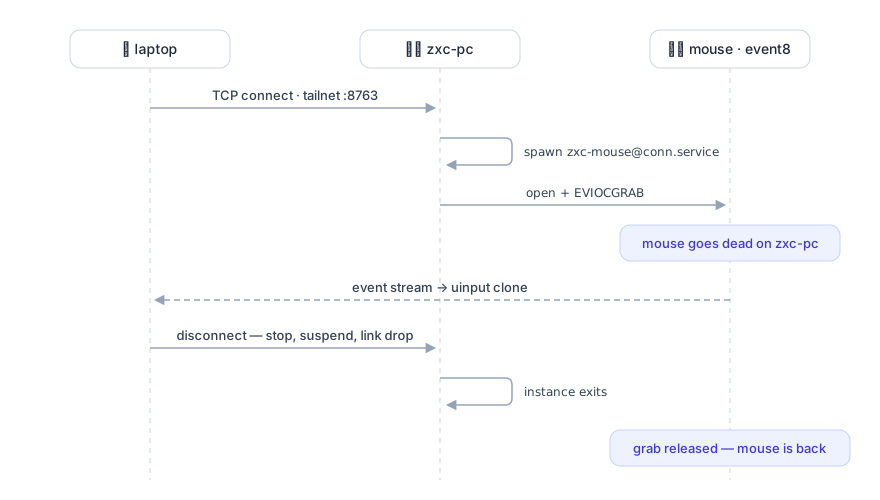
Nobody is grabbing anything while no one is attached. The mouse is a shared resource with connection-scoped ownership, which is exactly the semantics you'd want and exactly what an always-running daemon wouldn't give you.
On the laptop, the attaching end is one more unit:
# /etc/systemd/system/zxc-mouse.service
[Unit]
Description=Attach Logitech mouse exported by zxc-pc

[Service]
ExecStart=/bin/sh -c 'socat -u TCP:zxc-pc:8763,keepalive,keepidle=5,keepintvl=5,keepcnt=2 STDOUT | netevent create --duplicates=resume'
Restart=always
RestartSec=2
RestartSteps=8
RestartMaxDelaySec=60
DynamicUser=yes
SupplementaryGroups=input
Same trick on this side — netevent create needs /dev/uinput, which is
also root:input 0660, so the same throwaway-user-plus-one-group pattern
covers it. socat instead of nc because of the keepalive knobs: a mouse
stream is silent when the mouse is idle, so without keepalives a dead peer
looks identical to a boring evening. With keepidle=5,keepintvl=5,keepcnt=2
a vanished server is detected in ~15 seconds, the pipe exits, and
Restart=always walks the backoff (2 s → 60 s) until the server is back.
One deliberate omission: this unit has no [Install] section. It cannot
be enabled at boot, even by accident. systemctl start zxc-mouse is the new
"plug in the mouse"; systemctl stop zxc-mouse is unplugging it — and
handing it back to the machine it's physically attached to.
Did the interface scoping actually work? Two checks:
$ ssh zxc-pc ss -tln | grep 8763
LISTEN 0  4096  *%tailscale0:8763  *:*        # the % is SO_BINDTODEVICE

$ nc -z -w3 192.168.88.247 8763               # via LAN: refused
$ systemctl start zxc-mouse && systemctl is-active zxc-mouse
active                                         # via tailnet: streaming
The landmine
I promised a landmine. First start of the polished new service:
sh[1510469]: error: error while expecting hello packet: Success
The client connects, expects netevent's protocol hello, and gets EOF — reported with errno 0, the error message equivalent of a shrug. The server journal has the real story:
netevent[61925]: error: failed to grab input device: Device or resource busy
Something already held the exclusive grab. It was the prototype — the SSH
pipe from two hours earlier. I had killed my end of it, but the remote
netevent cat had no idea: it only touches its dead socket when the mouse
moves, and the mouse, grabbed and therefore inert, had not moved. A
process whose only job is to report motion, kept alive by the absence of
motion, holding the grab forever. The new service died against it on every
retry.
One pkill on the server later, the service came up and stayed up.
The landmine, part two
For a week, it did. Then the laptop came back from an overnight suspend and the mouse stayed dead — until I restarted the client service, which is exactly the kind of ritual this setup was supposed to abolish. The journal said the client had done everything right: socat's keepalive declared the peer dead ten seconds after resume, the pipe exited, systemd started walking the restart ladder — and every attempt died on the same shrug as before:
sh[2584918]: error: error while expecting hello packet: Success
Same client symptom, different server story. This time nothing was holding the grab:
systemd[1]: zxc-mouse.socket: Too many incoming connections (1), dropping connection.
MaxConnections=1 is up in the bullet list doing security work — "a second
client gets refused instead of fighting over the grab". Correct, as far as
it goes. But suspend doesn't send a FIN; the laptop just stops. The
pre-suspend instance — one day and twenty-two hours old by then — was still
holding its end of the connection, and its slot. Every reconnect from the
freshly woken laptop was dropped by systemd on the zombie's behalf.
It's the prototype's landmine again, one layer up. netevent cat never
reads from its socket — it writes, and only when the mouse moves. So the
zombie sat there until, three minutes into my debugging, a mouse-move write
finally came back with a reset:
netevent[85178]: write failed: Connection reset by peer
Slot freed, next retry connected, mouse alive — fifteen seconds before I "fixed" it by restarting the client. The restart was a placebo. And had I not been wiggling the mouse at it, the zombie would have held the slot indefinitely: a process that can only learn its peer is dead by talking to it, with nothing to say.
The embarrassing part: the fix was already in this article. The paragraph about the client's socat flags — a mouse stream is silent when the mouse is idle, so without keepalives a dead peer looks identical to a boring evening — is a diagnosis of exactly this failure. I wrote it about one end of the TCP connection and never thought about the other. The listening side takes the same three knobs, in systemd spelling, and accepted connections inherit them:
# zxc-mouse.socket, [Socket] — mirror of the client's socat keepalive
KeepAlive=yes
KeepAliveTimeSec=5
KeepAliveIntervalSec=5
KeepAliveProbes=2
Now the probes start going unanswered the moment the laptop sleeps, the instance is dead ~15 seconds later, and grab and slot are both free long before the laptop wakes. Which also finally makes the sequence diagram honest: it lists "suspend" as a disconnect, and now it is one.
The landmine, part three
Then I rebooted zxc-pc. First reboot since the sockets went in — and the
mouse was dead again, this time with the client logging Connection refused. Nothing was listening: the socket unit, the part whose whole job
is to outlive everything, was inactive (dead), with a boot-time epitaph:
systemd[1]: Dependency failed for Export Logitech mouse over Tailscale (netevent).
systemd[1]: zxc-mouse.socket: Job zxc-mouse.socket/start failed with result 'dependency'.
BindToDevice=tailscale0 is up in the bullet list doing security work too
— and on a virtual interface it is also, quietly, an ordering statement:
systemd translates it into "wait for the tailscale0 device unit". Follow
the arrows. The socket waits for tailscale0; tailscale0 is created by
tailscaled; tailscaled, an ordinary service, waits for basic.target;
basic.target waits for sockets.target; sockets.target waits for the
socket. A dependency cycle — threaded through a device unit, where
systemd's cycle detection can't see it. What breaks it is the 90-second
device-job timeout:
17:13:12 systemd[1]: Expecting device /sys/subsystem/net/devices/tailscale0...
17:14:41 systemd[1]: Timed out waiting for device /sys/subsystem/net/devices/tailscale0.
17:14:42 systemd-networkd[417]: tailscale0: Link UP
Ninety seconds of stalled boot, both sockets failed for good, and the
interface up one second later. Nothing retries a failed socket. And the
failure hides until the next reboot: enable --now at install time starts
the socket on a system where tailscale0 already exists, so it works every
time except the one that matters.
The fix is to stop asking sockets.target for something it cannot give.
The socket shouldn't start "at boot"; it should start when tailscale0
exists — which systemd can express directly, and which is the same
pattern wpa_supplicant@.service has used forever:
[Install]
WantedBy=sys-subsystem-net-devices-tailscale0.device
No boot job to deadlock, no timeout to race: the sockets are pulled up by the interface appearing — at boot, after a tailscaled restart, whenever. Reboot test: tailscale0 up four seconds into boot, sockets listening, the client walked its backoff and reattached on its own. The 90-second stall went with it.
The landmine, part four
Another suspend, another resume — and this time the mouse did come back on its own. It just took two minutes, which is a strange amount of time: too long to be right, too short to be broken. The journal shows a system doing everything correctly, slowly:
12:06:15 systemd-sleep[2810263]: System returned from sleep operation 'suspend'.
12:06:26 sh[2796395]: socat E read(5, ...): Connection timed out
12:07:26 systemd[1]: zxc-mouse.service: Scheduled restart job, restart counter is at 10.
Eleven seconds to declare the peer dead — part two's keepalive, working.
Then a full minute of nothing, and the reason is in the last line: restart
counter is at 10. That's the client's own backoff — RestartSec=2,
RestartSteps=8, RestartMaxDelaySec=60, praised back up the page as
"walks the backoff (2 s → 60 s) until the server is back" — sitting at the
top of its ladder.
What I had never asked: when does that counter reset? Not on a successful connection. Not on a successful hour — the stream that died at 12:06 had been up for ninety minutes, and the counter still ticked from nine to ten. It resets on a manual start, and on nothing else. Every suspend since the unit was installed had deposited one restart, none of them ever expired, and by now every resume paid the full sixty-second maximum — or two of them, when the first attempt landed while WiFi was still associating and burned its minute on a failed connect. The backoff wasn't backing off from the last failure; it was backing off from the unit's entire biography.
A backoff is a trade: slower recovery in exchange for not hammering something fragile. Here the fragile something is a TCP SYN over the tunnel every two seconds — roughly the load of a mouse click. The trade protects nothing and costs a minute per resume. So, deletion:
# zxc-mouse.service, [Service] — no ladder, just the two seconds
RestartSec=2
— plus the one line the deletion makes mandatory: StartLimitIntervalSec=0
in [Unit]. Flat two-second retries hit systemd's default start limit —
five starts in ten seconds — within half a minute of zxc-pc being down,
and a unit that trips the limit doesn't back off, it fails, permanently,
until a human restarts it. Deleting the backoff without that line trades a
one-minute landmine for a forever one. The battery unit next to it has
carried that exact line from day one, above a comment explaining precisely
this trap. I wrote the comment. I drew no conclusions from it.
Now a resume costs eleven seconds of keepalive plus two of restart delay: the mouse is back before the monitors are.
Was it worth it?
Latency over the LAN (Tailscale negotiates a direct path between machines on the same network) is imperceptible — mouse events are a few dozen bytes each, and the event clock is carried in the protocol. The whole thing cost three unit files and one 130 KB tool, runs with no root process and no sudo rule on either machine, exposes one port on one virtual interface, and gives the mouse back the moment I stop the service.
The dongle is still not here. The mouse never found out it's being forwarded.